Below, you’ll find the Sons of the Forest controls for Keyboard and Mouse and both PlayStation and Xbox controllers.
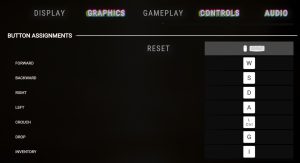
Note that all of the controls are remappable: go into the Controls tab of the Settings menu, then scroll down to Button Assignments. There, you can select the action you want to modify, either by left-clicking or by highlighting it and pressing /. The button assignment will then read “Press any key…” and count down from 5 — at this point, press the desired button you want to assign to the selection action to reassign it.
If you make a mistake while remapping and want to reset everything (rather than figuring out what you did wrong) you can press the “Reset” button, found at the top of the Button Assignments.
Control
Mouse + Keyboard
PlayStation
Xbox
Move Character
WASD
Crouch
Left Control
Drop
G
Inventory
I
Jump
Spacebar
Lighter
L
Reload
R
Run
Left Shift
Take
E
Dismantle
C
Utility (GPS/Walkie)
Unassigned
GPS Tracker
M
Unassigned
Unassigned
Walkie Talkie
T
Unassigned
Unassigned
Book
B
Rotate Right
R
Rotate Left
Q
Primary Action
Left Mouse
Secondary Action
Right Mouse
Interact
Left Mouse
Alternate Interact
Right Mouse
Place Element
Left Mouse
Toggle Place Mode
Right Mouse
Unassigned
Unassigned
Tertiary Action
Middle Mouse
Sleep
Z
Save
E
Skip
S
Reset
Unassigned
Select
E
Back
Backspace
Cancel Structure
X
Toggle Book Mode
X
Book Flip Next Page
Right Mouse
Book Flip Previous Page
Left Mouse
Place
C
Cycle Grab Bag Category
Q
Share this article:
DanielD
Unabashed FromSoftware fanboy still learning to take his time with games (and everything else, really). The time he doesn't spend on games is spent on music, books, or occasionally going outside.

 /
/ . The button assignment will then read “Press any key…” and count down from 5 — at this point, press the desired button you want to assign to the selection action to reassign it.